Start with the problem
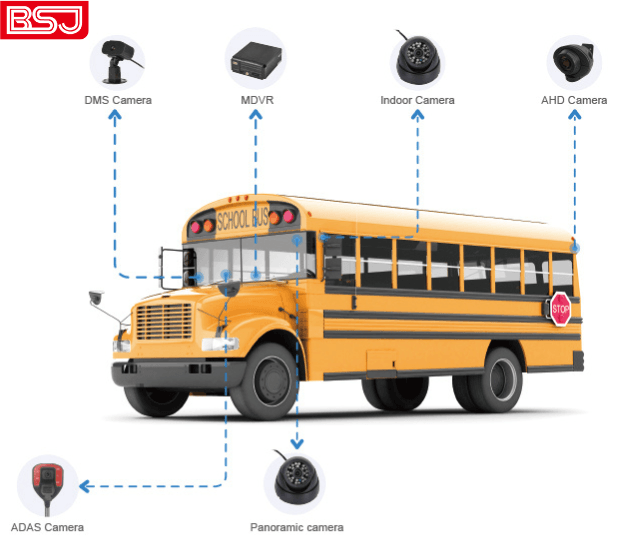
Fleets lose critical footage when DVRs drop frames, overwrite before an incident, or fail to tie video to location — and that gap creates liability, confused claims, and frustrated drivers. A clear fix is a DVR that keeps four synchronized streams, timestamps them with accurate position data, and survives vibration and heat. Many teams move straight to specs; pause and look at how drivers, dispatch, and investigators actually use footage from an AI dashcam. I’ve seen one municipal bus fleet in Los Angeles use recorded routes to resolve repeat complaints — that use-case shows why reliable GPS-linked video matters.
Define the exact problems your operation needs solved
Start by naming failure points. For most four-camera setups you’ll face:
- Lost context: front/rear/side angles not time-synced.
- Unreliable location: timestamps without GPS make video hard to verify.
- Storage surprises: footage overwritten before review window ends.
- Harsh conditions: heat, dust, vibration killing hardware.
Answer those directly; each should map to a DVR feature you require.
Which technical features actually fix those problems
Look for specific, testable capabilities, not marketing claims:
- Simultaneous 4-channel recording with independent and combined streams — ensures no angle is sacrificed when one camera spikes in bitrate.
- Pre- and post-event buffering — captures the seconds before a trigger and preserves them.
- GPS-integrated timestamps and speed overlay. Confirm support for dash cams with GPS so each frame links to a map and route log.
- Robust codecs with hardware acceleration (H.265 preferred) to extend retention on fixed storage sizes.
- Shock- and heat-rated enclosure plus mounting options for commercial vehicles.
- Secure tamper detection and authentication for evidentiary weight.
Demand proof: sample clips showing synchronized angles, a GPS track export, and a specification sheet listing operating temperature and shock ratings.
Installation and UX that actually get used
A technically perfect DVR fails if drivers and technicians can’t operate it. Prioritize:
- Simple wiring harnesses with labeled channels to avoid swapped cameras.
- An in-vehicle UI that shows all four feeds at a glance and a clear event log for quick playback.
- Remote access options for dispatch with role-based controls — investigators don’t need the same permissions as drivers.
- Clear LED or audible cues so drivers know recording is active without distracting them.
Run one installation as a pilot and observe how crews interact with the UI; small friction points predict large adoption problems.
Common mistakes that cost time and money
Avoid these predictable errors:
- Buying for peak specs (highest resolution) without checking storage retention — more pixels equals less retention unless you plan storage accordingly.
- Assuming GPS will be accurate without testing under canopy, tunnels, or urban canyons; validate position hold in your service area.
- Neglecting power isolation — improper wiring leads to corruption during engine cycles.
- Ignoring maintenance access — frequent firmware updates and SD checks must be easy for field techs.
Plan for real-world conditions rather than ideal lab numbers.
Quick comparison of viable alternatives
Three practical paths for four-camera fleets:
- Onboard 4-channel DVR: best for local storage control and offline environments; choose one with hardware H.265, GPS, and secure storage.
- Hybrid DVR with periodic upload: stores locally but offloads critical clips when on Wi‑Fi; reduces cellular costs while preserving evidence.
- Cloud-first telematics with integrated cameras: convenient for centralized monitoring but needs reliable connectivity and raises recurring costs.
Match choice to your retention policy, cellular budget, and whether evidence must be available immediately to dispatch.
Putting it all together
Choose a DVR that directly resolves the failures you named: synchronize four channels, lock each frame to GPS, guarantee pre/post-event buffering, and survive the vehicle environment. Validate those claims in a real install and watch how footage works in practice for drivers, dispatch, and claims. If you need a solution that packs those capabilities and sensible UX into a single offering, consider vendors that combine proven hardware with field-tested interfaces like BSJ; that match between engineering and user needs is what keeps footage reliable, usable, and trusted.